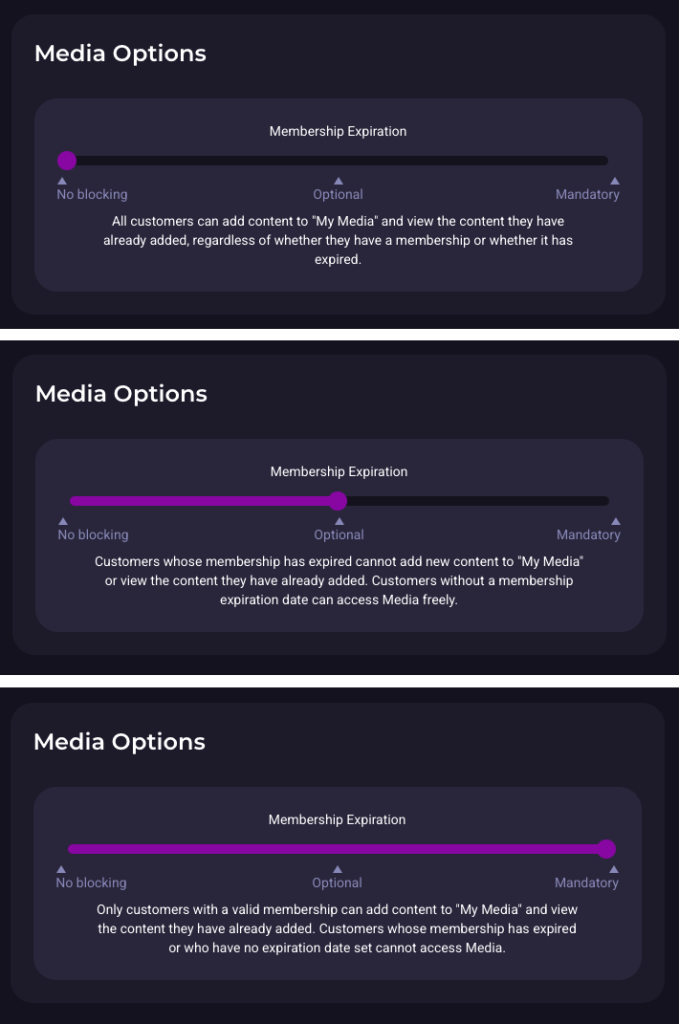
You can prevent customers whose membership has expired from adding Media to „My Media” or viewing content they’ve already added. This setting is separate from the one for activities: even if you’ve already blocked bookings for customers with expired memberships, Media will remain accessible until you enable this restriction too.
Go to Settings > Global Booking Options and, under Media Options, choose one of the three available settings:
- No restrictions: All customers can add content to „My Media” and view content they’ve already added, regardless of their membership expiry date.
👉 Note: This is the default setting and reflects how BookyWay worked before the new options were introduced. - Optional: Customers with expired memberships cannot add new content or view content they’ve already added. Customers without a membership expiry date can still access Media freely.
- Required: Only customers with a valid membership can add or view content. Customers whose membership has expired or who don’t have an expiry date set cannot access Media.
IMPORTANT
- The restriction also applies to content already in „My Media”. Customers will regain access as soon as you update their membership expiry date, with no additional steps required.
- What does a restricted customer see? When they try to add or open content, they’ll see the message: „Your membership has expired. Please contact your center.” If they contact you, check the expiry date in their customer profile. The „Surprise Me” button indicates whether they can currently access Media.
- Can I add Media for them from the admin panel? Yes, but you’ll see a warning. The customer will be registered for the Media and the corresponding credits will be deducted, but they won’t be able to view the content until their membership is valid.