
The price list is your first sales tool, your silent salesperson.
A perfect price list is not the one with the most items or options, but the one that removes doubts and drives purchases: the customer immediately sees what to choose, how much to spend, and what they get; you sell with less friction, protect your margins, and get paid sooner. It is the first impression that turns the curious into clients and occasional clients into regular ones.
With BookyWay credits this becomes simple: 1 credit ≈ 1 currency unit, single lesson to try, packages with progressive discounts, clarity for multi-activity and multi-currency, transparent validity rules.
In the following sections we will see how to build your perfect price list: activity map, credit/currency parity, why always sell the single lesson, and how to create packages that sell (and explain) at a glance.
Why the credit model
Because our ten years of experience with thousands of customers using BookyWay has shown us that the credit model is more effective than the subscription model.
See HERE why the credit model is winning
In this article we explain how to build a clear and effective credit-based price list. The same logic also applies to non-fitness activities (e.g. driving school, dog training courses, music, languages, webinars, bookstores, etc.): credit is a neutral unit that makes it simple to manage different prices with a single wallet.
What we don’t cover here
We will not go into the exact price of each activity or the precise discounts of the packages, since these aspects depend on variables such as: course quality; location; facility; target; market and competitors; teacher’s authority; capacity, etc. Here we set the method to build the price list.
Step 1 — Activity map
We immediately identify all the activities we will schedule (e.g. Yoga, Dog Agility, Driving lesson).
Step 2 — Value in credits = value in euros
We assign each activity a value in credits equal to its price in your currency (EUR, CHF, GBP, etc.).
Example (in EUR): if Yoga costs €10, I assign 10 credits.
Why it is crucial:
- Management of activities with different prices, even if now you only offer one activity, it is very likely you will add others in the future, even just an event (with a different price).
- Immediate transparency for the client (1 credit ≈ 1 currency unit).
- Readable discounts in packages (the “cost/credit” decreases as the package grows).
- Multi-country consistency: change currency without rewriting the pricing logic.
- Clear reporting (conversions and revenues per credit).
Avoid “1 credit for everything” lists: they prevent proper differentiation of prices among activities
In addition to packages, always offer the Single Lesson:
- it’s the trial entry (lowers the barrier to purchase);
- reduces the new client’s commitment anxiety;
- increases the conversion rate from first contact to paying client.
Always sell the single lesson
Step 3 — Create credit packages (not lesson packages)
We start creating the credit-based price list through BookyWay’s Shop function, applying greater discounts to the purchase of larger credit packages.
Practical Example
Let’s consider three different activities with their prices (just as an example – they wouldn’t usually coexist in a single center).
You will enter the types of activities that fit your business.
This will be the first stage of your price list, allowing every client to make even a one-time purchase to book a single class.
Base prices (EUR example):
Driving Lesson — Single = 50 credits = €50
Yoga — Single class = 10 credits = €10
Dog Agility — Single class = 15 credits = €15
So we’ll start creating the BookyWay price list like this:

At first, we associate the specific class name to the package (clients will use the corresponding credits for that activity). BUT in the following packages, we’ll no longer write the activity name—we’ll encourage purchases through the discount logic on credits, not on the number of lessons.
Now let’s start encouraging the client by offering credit packages with discounts, for example:
50 credits = €45 (0.90 €/credit)
Examples: 5 Yoga OR 3 Dog Agility OR 1 Driving Lesson
90 credits = €75 (≈0.83 €/credit)
Examples: 9 Yoga OR 6 Dog Agility OR 1 Driving Lesson + 25 credits
250 credits = €200 (0.80 €/credit)
Examples: 25 Yoga OR 16 Dog Agility OR 5 Driving Lessons
400 credits = €288 (0.72 €/credit)
Examples: 40 Yoga OR 26 Dog Agility OR 8 Driving Lessons
It goes without saying that the customer will likely purchase a package that allows them to use up all the credits for a specific activity; therefore, your job is to study the price list with this in mind. BUT it’s important to understand that you’re actually selling credit packages, not lesson packages; so it’s perfectly normal that, since a package can be used to book different activities, the customer may end up with some unused credits, which will then be added to the next purchase.
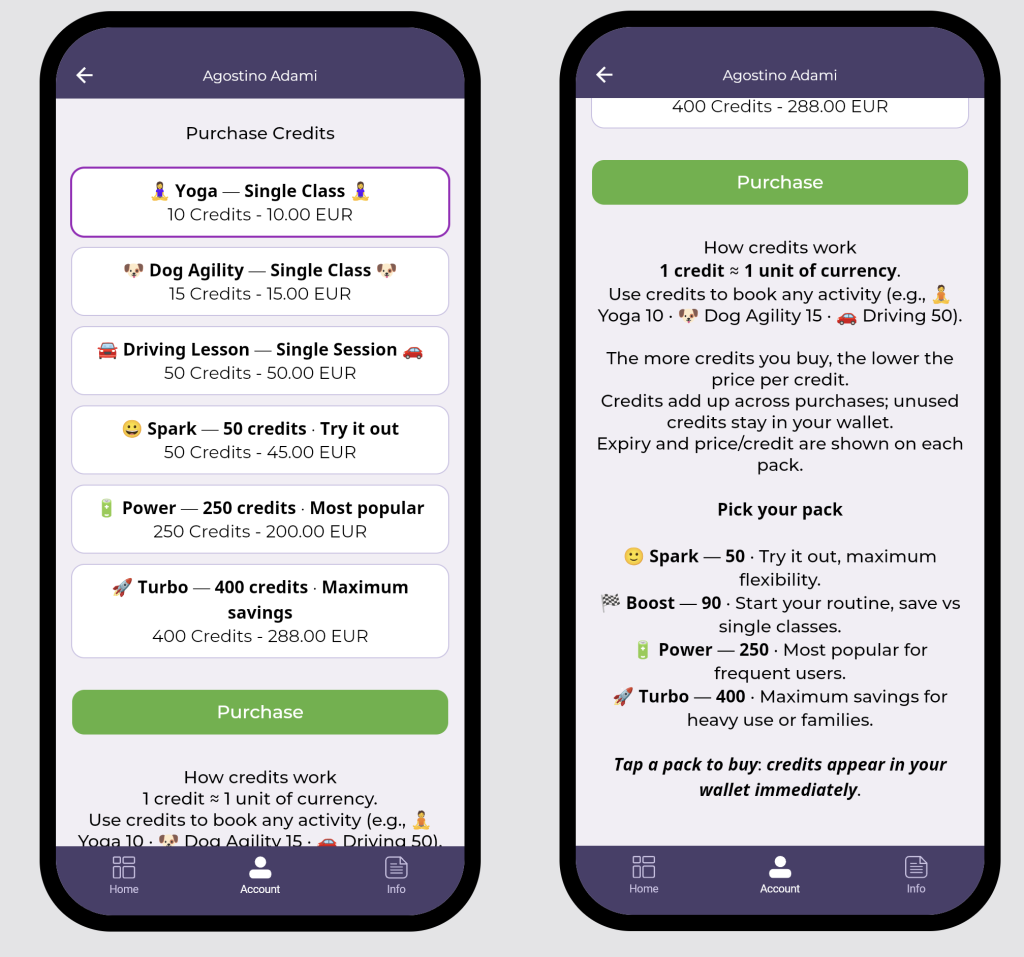
As you can see in the image below, when you set up this price list in the BookyWay shop, the right-hand column shows the price per credit, which should always be lower as the proposed package size increases—in other words, it should be more heavily discounted to encourage the user to buy.
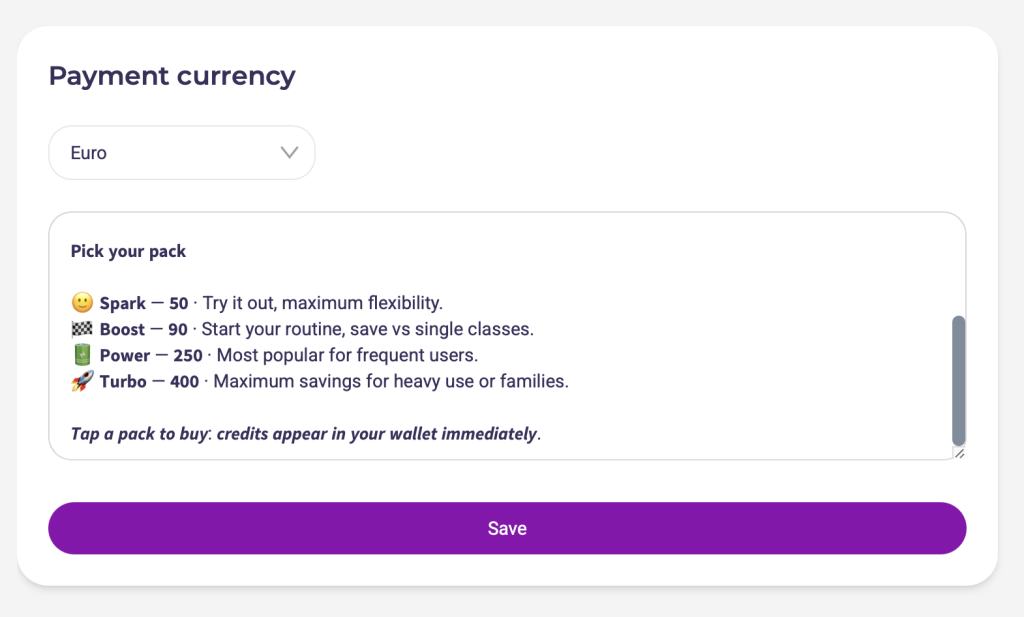
Giving packages a name helps highlight each package’s features, while the legend lets you add explanatory notes so the customer clearly understands what they will be able to book after purchasing a specific package.

Now all that’s left is to create the legend to place in the store, which will then be visible from your clients’ app. For example:
How Credits Work
- 1 credit ≈ 1 currency unit.
- Use credits for any activity (e.g., 🧘 Yoga 10 · 🐶 Dog Agility 15 · 🚗 Driving 50).
- The more credits you buy, the less you pay per credit.
- Credits accumulate across purchases, and unused ones remain in the wallet.
- Expiration date and cost/credit are indicated on each package.
Choose Your Package
- 🙂 Spark — 50 · Trial and maximum flexibility
- 🏁 Boost — 90 · Start your routine, save compared to singles
- 🔋 Power — 250 · Most popular with regular clients
- 🚀 Turbo — 400 · Maximum savings for heavy use or families
Tap a package to purchase: the credits will appear instantly in your wallet
And here is your perfect price list as your client will see it in the app
What if I want to add an expiration date to credits?
We are currently working on a new release that will allow you to set an expiration date for purchased credits, which will then be automatically reset once expired.
In the meantime, you can handle it this way:
If payment is made at the desk:
- The client pays at the desk for a credit package.
- The administrator enters the user’s profile, loads the credits, and sets the membership expiration date as the credit expiration date.
- From that point, the client can book all the classes they want until credits run out, but they cannot book activities beyond the membership expiration date, even if they still have credits left.
- When the client comes back to buy new credits, the administrator enters their profile, deletes any remaining old credits (we recommend adding a note in reports such as “expired”), loads the new ones, and updates the membership expiration date.
If payment is made through the app:
The flow is the same, but it cannot be done synchronously because the administrator cannot see payments in real time. It’s enough to check, for example once a day (or weekly, depending on credit duration), inside the Stripe platform, see new credit purchases, and assign the corresponding membership expiration date to each client.
The only slightly delicate situation occurs if a client buys new credits before expiration and still has unused ones. In this case—since it’s a clear sign of “loyalty”—we recommend simply adding the new credits and extending the expiration, avoiding complications.
If you want to learn more about the credit package sales strategy, read this article
Tips & Tricks — Icons, Highlights & Formatting
Emoji (Why and How)
- Why: they guide the eye, make the price list more readable and recognizable.
- How: use 1 emoji at the beginning of the title (optionally one at the end), always the same for the same category/package. Max 1–2 per line. Don’t rely solely on emojis for critical info.
- Example: 🧘 Yoga — Single class (10 credits) · Trial
Text Formatting (Bold)
- Why: to highlight 1–2 keywords (e.g., cost/credit, Maximum savings).
- How in BookyWay: there is no native bold; paste preformatted text from a “social” editor (bold/italic generators).
- Use sparingly: just a few words, not full sentences.
- If bold doesn’t display properly (Plan B that works on all phones):
- Write important words in ALL CAPS or put them in [square brackets]; if you like, add an emoji in front.
- Quick test: try on iOS and Android. If you see strange characters/boxes, switch immediately to Plan B.
Mini-Templates
- Package: 🚀 Turbo — 400 credits · Maximum savings
- Activity: 🐶 Dog Agility — Single class (15 credits)
If you want to watch the video tutorial on managing credit packages with BookyWay, click HERE