📌 1. WHAT IS THE NOTICEBOARD AND HOW CAN I USE IT?
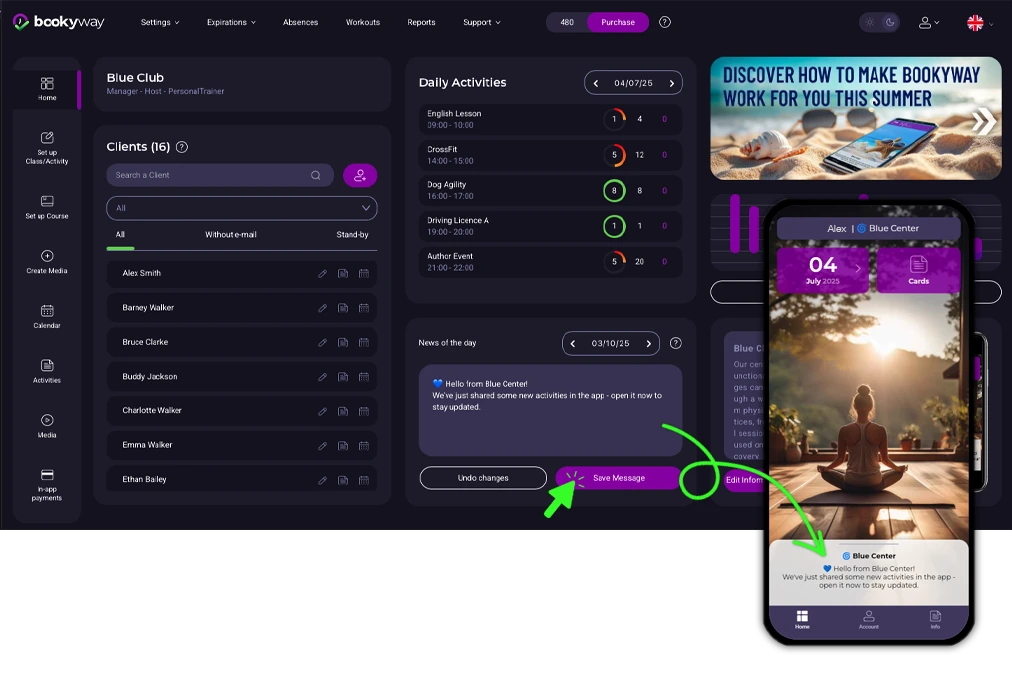
The Noticeboard is a space always accessible in the app, where you can post messages visible at any time to your clients.
- What is it for?
To share rules, updates, events, promotions and important notices. - How to publish a message?
Log in to the admin platform, go to the Noticeboard section and write your message. Once published, the message is immediately visible to all app users. - How will my clients see the messages?
Messages appear in real time on the homepage of the BookyWay app.
🔔 2. WHAT ARE PUSH NOTIFICATIONS AND WHEN TO USE THEM?
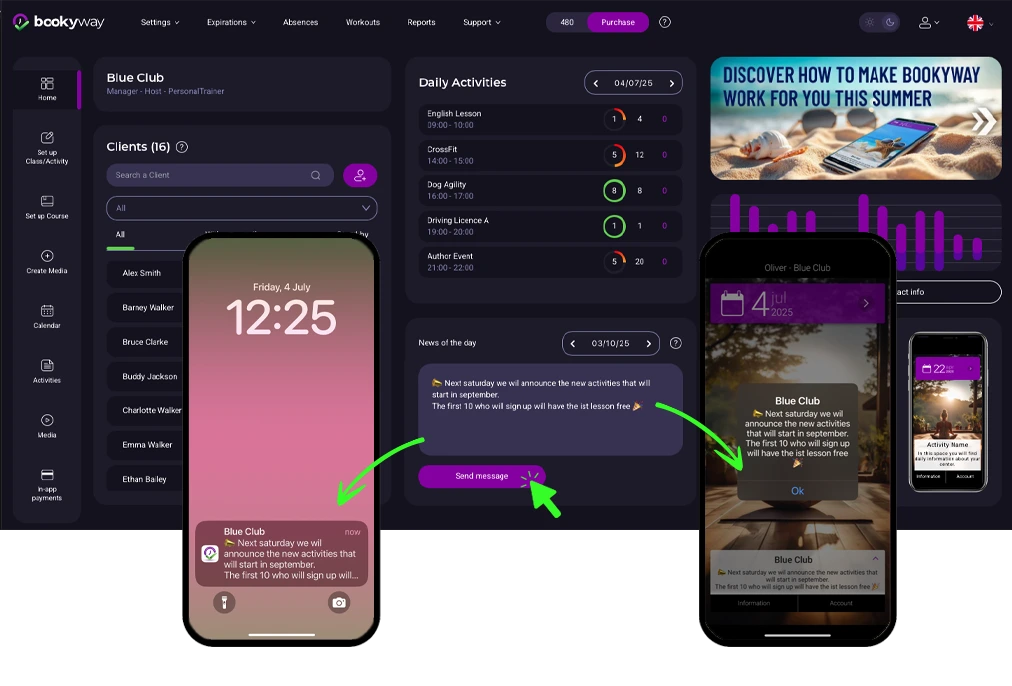
Push Notifications are instant messages that appear as alerts directly on your clients’ smartphones, even if the app is closed or the screen is locked.
- When are they useful?
For urgent communications such as sudden closures, schedule changes or last‑minute promotions. - How to send them?
From the admin panel, create the message in the Noticeboard section. After writing the text, click “Send” to also send it as a push notification. - How do clients receive the notification?
Clients receive an alert on their phone. Tapping the notification automatically opens the BookyWay app.
📣 Maximize the effectiveness of your push notifications
👉 Click here to see practical tips and strategies in our dedicated article
📧 3. WHAT ARE AUTOMATIC EMAILS AND WHICH COMMUNICATIONS DO THEY SEND?
Automatic Emails are messages the system sends independently in certain situations, without you having to write them manually.
- What emails are sent automatically?
- Invitation to join BookyWay with access credentials
- Class/course registration by the administrator
- Multiple registrations for a user in multiple classes by the administrator
- Automatic move from waitlist to class
- Class cancellation due to lack of participants or other reasons
- Private message to a group of participants in a specific class
- Registration of a family member in the system (e.g. a child)
- Password reset request
- What about group emails?
- Notification to all participants in case of class cancellation
- Specific communications addressed to all participants of a class
❓ 4. WHY USE THESE TOOLS INSTEAD OF MANUAL EMAILS OR WHATSAPP?
- They allow you to maintain direct, clear, and professional contact with your clients.
- They are integrated directly into the BookyWay app, so you don’t need external channels or unofficial messaging apps.
- They save you time with automatic communications and help you avoid errors or omissions.
⚠️ Important to know ⚠️
The noticeboard and push notification share the same message, but serve different functions.
💡 Practical tip 💡
If you need to communicate something only temporarily or urgently, use the push notification and then restore the permanent message on the noticeboard.
👉 All these tools help you maintain a direct and professional connection with your clients, without having to use external channels such as manual emails or WhatsApp groups.

